A tour of the modules
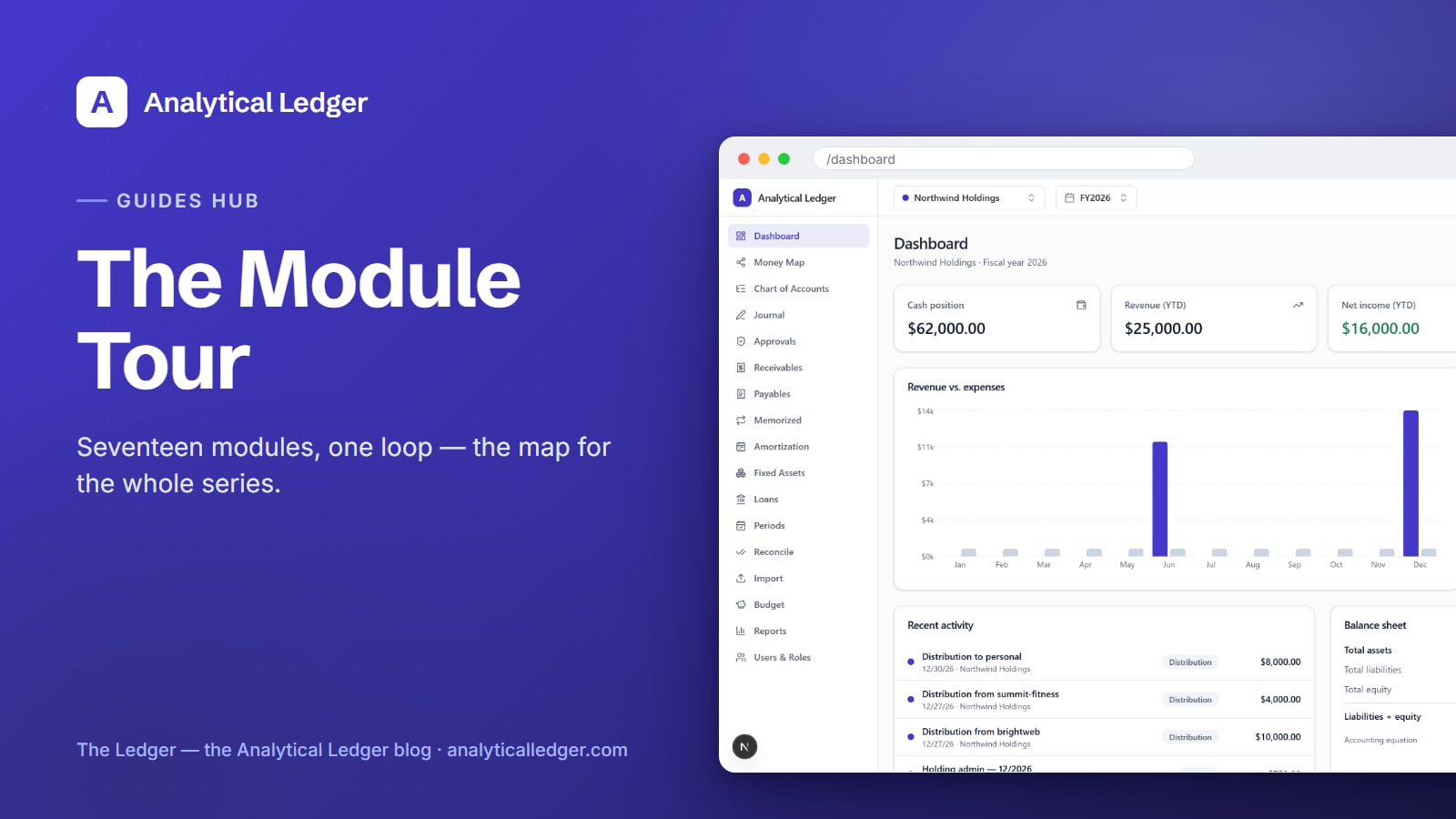
Seventeen modules sounds like a lot. It's really one loop — money in, money recorded, money reported — broken into the pieces that keep each step correct.
TL;DR
- Analytical Ledger has 17 modules that together cover the full accounting loop: import and reconcile your bank and card statements, keep a correct general ledger, run receivables and payables, budget against actuals, and produce real reports. This post is the tour — a plain map of what each module does.
- You don't need all 17 on day one. Most owners start with three: Chart of Accounts, Import, and Reconcile.
- This is the hub for the Guides series. Each module gets its own step-by-step how-to; they hang off this map, so start here and follow the one you need.
How do 17 modules fit together?
They follow the money. Cash comes in and goes out (Import), you match it to reality (Reconcile), you record it correctly (Journal, on a Chart of Accounts), and you read it back as statements (Reports). The rest — AR, AP, Budget, Fixed Assets, and so on — are the specialized tools for the transactions that don't fit a single line. We run our own group of companies across all of them, monthly.
Below, the modules are grouped by the job they do, in roughly the order money moves through them. Each is the sidebar label you'll see in the app.
See where you stand
Dashboard — a per-entity or consolidated overview of the fiscal year: the KPIs and charts that answer "how are we doing" at a glance. It's the first screen most days, and the fastest read on the condition of the business.
Money Map — a visualization of how money moves across the whole group, including the inter-entity flows between your companies. When one entity lends to or bills another, this is where the picture stays honest.
The core ledger
Chart of Accounts — a 118-account best-practice chart, mapped to IRS Schedule C and Form 1120 lines, so the books already line up with how you file. Every account drills into its own register.
Journal — the general ledger itself: a multi-line debit/credit editor that balances live as you type. Debits must equal credits before an entry can post, so an unbalanced entry never sneaks in.
Approvals — segregation of duties for the entries that matter. Set a threshold, and anything above it needs a second person to approve before it posts — a control that keeps one hand from doing everything unchecked.
Bring money in and pay it out
Receivables (AR) — invoices, customers, and AR aging in one place. See who owes you, how much, and how overdue, without a spreadsheet on the side.
Payables (AP) — the mirror image for money you owe: bills, vendors, and AP aging, so nothing slips past its due date unseen.
Memorized — templates for the entries you make again and again. Post recurring transactions on demand instead of retyping them, and keep the recurring ones consistent every time.
Bring in and match the bank
Import — bank and card CSV/OFX import with deduplication, a rules engine, and AI-assisted categorization. The rule is AI proposes, human approves, triggers validate — the machine drafts, you decide, and re-importing the same file won't double-count.
Reconcile — statement reconciliation for your cash and card accounts. Match what the ledger says against what the bank says until they agree to the cent — the step that turns "probably right" into "known right."
Timing, assets, and debt
Amortization — schedules for prepaid expenses and deferred revenue, recognized evenly over their term. Pay a year of insurance up front, and the expense lands month by month instead of all at once.
Fixed Assets — a register for capitalized assets with their depreciation. Track what you own and how its book value falls over time, without a side calculation.
Loans — amortization schedules that split each payment into principal and interest automatically, so a loan payment posts correctly instead of landing in one lump.
Close and report
Periods — monthly periods with open, closed, and locked states. Close a month to gate further posting, so a finished period stays finished and can't be quietly edited later.
Budget — monthly budgets per account, with budget-versus-actual variance and a forecast view. Set the plan, then watch where reality diverges from it.
Reports — the real statements: P&L, Balance Sheet, Trial Balance, and Cash Flow, consolidated across entities with automatic intercompany elimination. Plus a Board Pack, a Tax Rollup, 1099-NEC/MISC for vendors over $600, a 13-week direct cash forecast, and CSV and QBO export.
Control and access
Users & Roles — owner-managed, role-based access: viewer, accountant, or owner, enforced at the database-action level. Give a bookkeeper what they need without handing over the keys to everything.
Where should you start?
Start with three modules: Chart of Accounts, Import, and Reconcile. Set up the chart (or use the 118-account default), import your bank and card history, and reconcile until the numbers agree. Once cash is caught up and trusted, add Reports to read it back, then reach for AR, AP, Budget, or the rest as the work calls for them.
What most owners get wrong here
The mistake is thinking you must adopt all 17 modules before the tool is useful. You don't. Analytical Ledger is correct with three modules or seventeen — the extras exist for the transactions that need them, not as a checklist. Turn to Amortization, Fixed Assets, or Loans the first time you have a prepaid expense, a capitalized asset, or a loan to track. Until then, they wait.
Frequently Asked Questions
Do I need to use all 17 modules?
No. Most owners run day-to-day on a handful — Chart of Accounts, Import, Reconcile, and Reports — and reach for the rest only when a specific transaction calls for it. The extra modules add capability without adding required steps; an unused module simply sits idle.
Which module should I start with?
Start with the Chart of Accounts, then Import, then Reconcile. Set up the accounts (or use the 118-account default), pull in your bank and card history, and reconcile until the ledger agrees with the statements to the cent. That gets you caught up and trusting the numbers first.
Is there a guide for each module?
Yes — each module gets its own step-by-step how-to in the Guides category, and this tour is the hub they hang off. Start here for the map, then follow the guide for the module you need. New guides are linked from this post as they publish.
What is the chart of accounts based on?
It's a 118-account best-practice chart mapped to IRS Schedule C and Form 1120 lines, so your books already line up with how you file. Each account drills into its own register, and tax season becomes a rollup instead of an excavation.
Is Analytical Ledger free to use?
Yes. Every module described here is included at no cost — there's no monthly fee and no per-module or per-entity charge. The source is being prepared for open-source release, and donations are welcomed to fund development but are always optional.
Start with the module you need
You don't have to learn all seventeen at once. Pick the one that solves today's problem — a pile of unreconciled statements, a report you need, a budget to set — and open the app to that module. If you're new here, the reason we built this explains what it's for.
About Analytical Solutions — we build Analytical Ledger and run our own group of companies on all 17 of these modules, daily. The whole tool exists so no owner has to choose between running the business and knowing its condition. Learn more about us.