How to use the Payables module
You paid a vendor twice last quarter because the first payment lived in your inbox and the second one lived in your head. Neither lived in your books.
- Accounts payable is the money you owe suppliers, and the Payables module tracks it end to end: add a vendor, record each bill against them, and every bill posts to an AP control account that clears the moment you pay. An aging view flags what's due and what's overdue.
- Know your real cash position — what's on the books minus what you still owe.
- Keep vendor 1099 details on file all year, so 1099-NEC and 1099-MISC are a report you run, not a January scramble.
- Pay on time without double-paying: every open bill sits in one list instead of scattered across email. New to the app? Start with the module tour.
Why unpaid bills quietly wreck your cash picture
Bills you owe but haven't recorded are the fastest way to fool yourself about cash. Your bank balance looks healthy, so you spend — then three vendor invoices come due the same week and you're short. Money you owe is real whether or not it's in your books; the only question is whether you can see it coming.
The pile builds the same way the statement pile does. A bill arrives by email, you mean to log it, the day gets busy, and it's gone. By month end you can't say what you owe without digging through your inbox — and that's when double-payments happen, late fees creep in, and a vendor you rely on gets tense over money you actually had.
The Receivables module tracks money owed to you. Payables is its mirror image for money you owe — and running both is how you see the full picture instead of half of it.
How to set up Payables and record your first bill
Payables is the module for money you owe, and it opens on three tabs: Bills, Vendors, and Aging. The flow is always the same order — create a vendor, record bills against that vendor, then pay the bills to clear them. You add each payee once and reuse it for every future bill.
Step 1 — Add the vendor first
Open the Vendors tab and add each supplier you pay: the utility company, your contractor, the SaaS subscription, the landlord. A vendor is created once and reused, so you're building a payee list you'll lean on for years, not just for one bill.
While you're there, fill in the 1099 fields on the vendor record — the is-1099 flag, the vendor's tax ID, and a default 1099 box. Do it now, at setup, and year-end reporting takes care of itself.
Step 2 — Record a bill against the vendor
Switch to the Bills tab and choose New bill. On a fresh entity this tab starts empty, waiting for the first bill you enter.
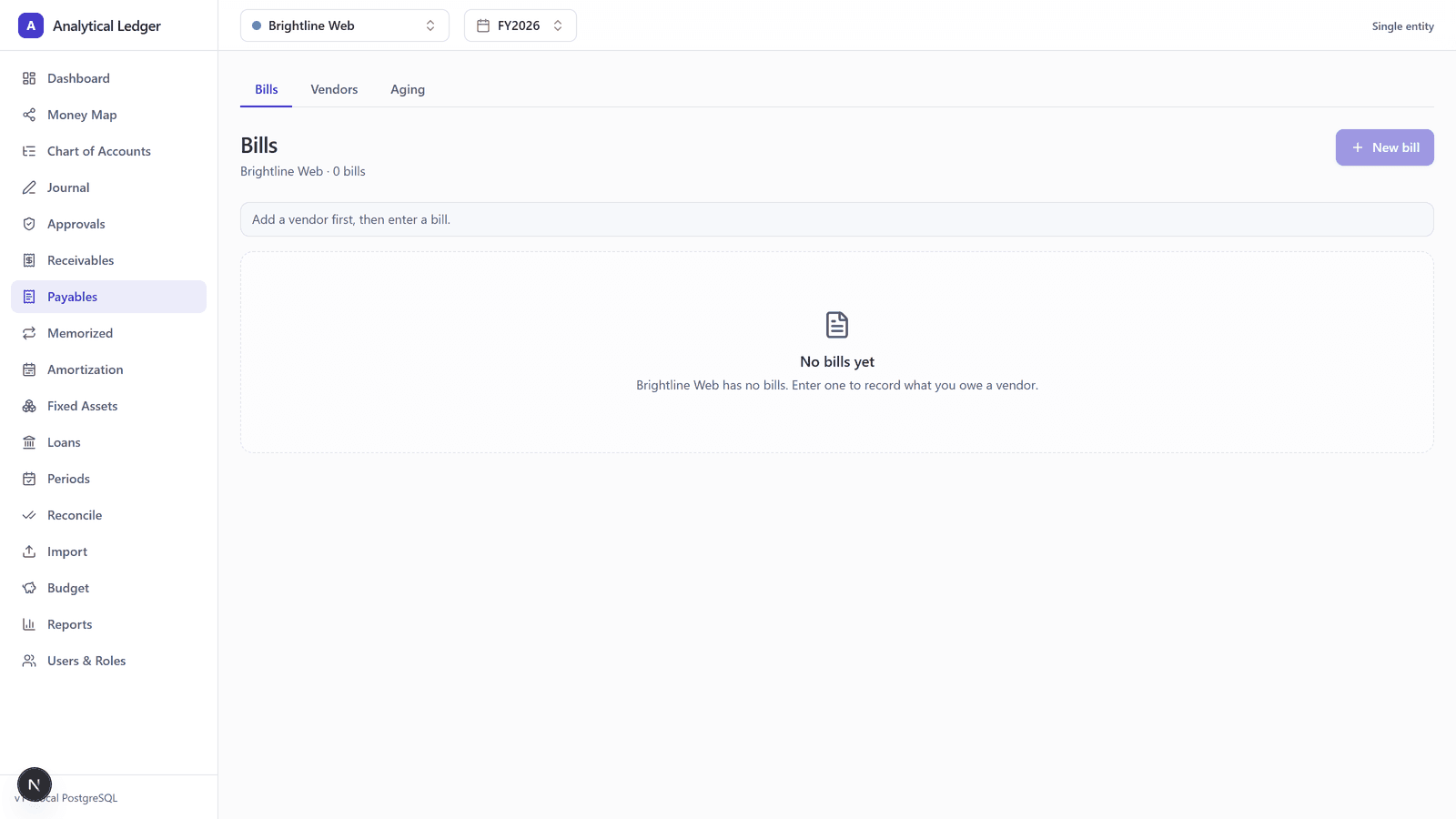
Pick the vendor, enter the amount and the due date, and choose the expense account the bill belongs to — rent, utilities, contractor labor — from your chart of accounts. When you save it, the bill posts as a real double-entry transaction: it debits the expense and credits an accounts payable control account — the single account that holds everything you owe.
Step 3 — Watch the AP control account carry your balance
Every open bill sits in that AP control account until it's settled — the one number that answers "what do I owe right now," instead of a mental tally across a dozen invoices. Because it's a real posted entry, that amount flows straight onto your Balance Sheet as a liability, with no side spreadsheet to reconcile.
Step 4 — Pay the bill to clear it
When you pay a bill, record the payment against it. That clears the bill from open status and reduces the AP control account by the same amount — the liability comes off your books exactly when the money leaves. Money is stored as exact decimals and every entry has to balance, enforced in the app and again by database triggers, so the AP balance is correct to the cent, not "close enough."
What does the Aging tab actually tell you?
The Aging tab sorts every open bill into buckets by how close it is to due — and how far past due it already is. It answers two questions at a glance: what has to be paid this week, and what's already late. You scan one view and know where you stand.
That's the tab you glance at before you spend. If three big bills land in the same bucket, you see the crunch before it hits the bank, not after. Pair it with the 13-week cash forecast in the Reports module and short-term cash stops being a guess.
How Payables makes 1099 season a non-event
Because you filled in the 1099 fields when you added each vendor — the is-1099 flag, the tax ID, and the default 1099 box — the app already knows which vendors are reportable and how much you paid each across the year. At year end, the 1099-NEC / 1099-MISC report rolls that up for you — no chasing down tax IDs in January for contractors you paid last spring.
That's the quiet payoff of recording bills as you go: the data for 1099s is a byproduct of paying your bills correctly all year. The report just reads what's already there.
We run our own group of companies — and our personal finances — on Analytical Ledger, daily, in production. Payables is where we log every vendor bill, and the 1099 fields on each record are why our year-end contractor reporting is a report we run, not a weekend we lose.
What people get wrong about accounts payable
The common mistake is treating a paid bill and an owed bill as the same event — logging the expense only when the money actually leaves the account. That's cash-basis thinking, and it hides every obligation you've taken on but haven't settled yet.
Record the bill when it arrives, not when you pay it. The gap between those two moments is your accounts payable — the money you owe right now. Skip the first step and your Balance Sheet understates your liabilities, your cash looks better than it is, and the Aging tab has nothing to warn you with. Payables captures the obligation the day it exists and clears it the day you settle — miss the first half and the whole point breaks.
Frequently Asked Questions
What's the difference between a bill and a payment in Payables?
A bill is money you owe a vendor; a payment settles it. Recording a bill posts a liability to your AP control account the day the invoice arrives. Recording a payment clears that bill and reduces the AP balance the day the money leaves. Keeping them separate is what lets you see what you still owe.
How do vendor 1099 fields feed the year-end report?
Each vendor record carries an is-1099 flag, a tax ID, and a default 1099 box. Fill them in when you add the vendor, and the app tracks which payees are reportable and how much you paid them all year. At year end, the 1099-NEC / 1099-MISC report rolls it up automatically — no January scramble for tax IDs.
Can I see everything I owe in one place?
Yes. Every open bill posts to a single accounts payable control account, so the amount you owe across all vendors is one number, not a mental tally. The Aging tab breaks that total into due-and-overdue buckets, and the balance flows straight onto your Balance Sheet as a liability, correct to the cent.
Is the Payables module free to use?
Yes. Payables is included with every other module at no cost — no monthly fee, no per-vendor or per-entity charge. Analytical Ledger is a free USD-only web app you can self-host or run in your own cloud, and the source is being prepared for open-source release. Donations are welcomed to fund development but always optional.
See what you owe before it surprises you
Payables is how you put the money you owe where you can see it. Add your vendors, record bills as they arrive, and the Aging tab keeps next week's cash crunch from being a surprise. Follow the mirror-image Receivables guide next, or see every module in context on the app. Questions about your setup? Talk it through with us.
About Analytical Solutions
Analytical Solutions builds Analytical Ledger — free, correct-to-the-cent double-entry accounting with every entity in one place, vendor bills and 1099s included. We run our own group of companies on it, in production, every day. More about us.