
How to track budget vs. actual in Analytical Ledger
You set a number in January. By June, you have no idea whether you're beating it or blowing past it — because the plan lives in one spreadsheet and the real numbers live somewhere else.
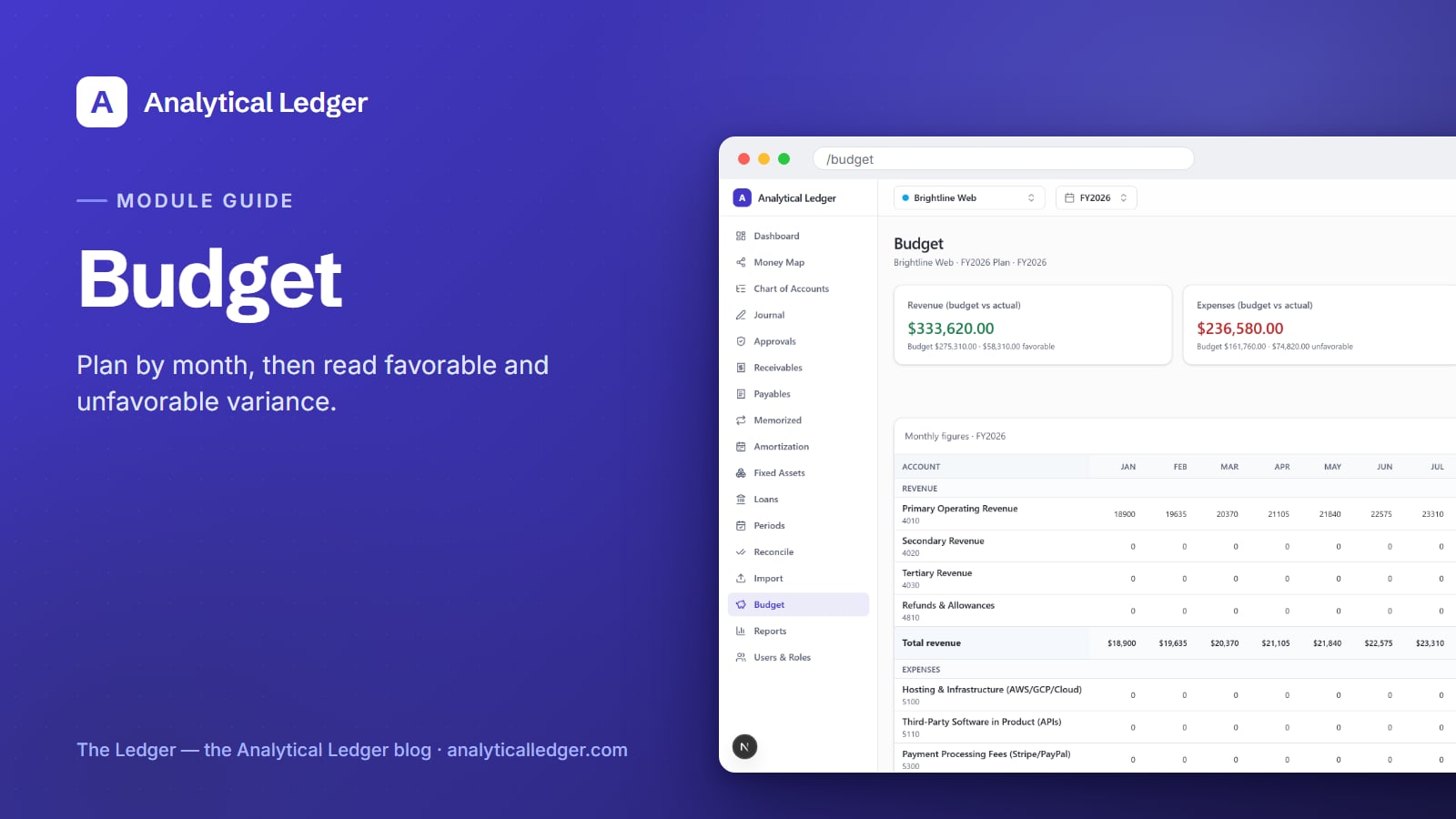
- Budget vs. actual is how you check the plan against reality. In Analytical Ledger's Budget module you enter a monthly plan per account for the fiscal year, and the budget-vs-actual view lines your planned number up against what you actually posted — per account, per month — and totals the gap as a favorable or unfavorable variance. No exporting, no side-by-side spreadsheets.
- Enter next year's plan in a single grid of accounts down, months across.
- See at a glance whether you're over or under, and by how much, on every line.
- Forecast the remaining months so the full-year picture updates as the year runs.
Start from the tour of all 17 modules if you want the map first, then come back here for the Budget walkthrough.
Why a budget you never check is just a wish
A budget only earns its keep when you compare it to what happened. The cost of skipping that check is quiet: you overspend for months without noticing, you find out at tax time that a category doubled, and you make hiring or inventory calls on a gut feel instead of the gap between plan and actual.
Most owners set a budget once — a January spreadsheet, a few round numbers — and never open it again. The plan and the real ledger drift apart immediately, and the overspend only surfaces once the quarter is already gone. The point of a budget is not the number you type in; it's the difference you watch all year.
How to build a budget for the fiscal year
Building a budget in Analytical Ledger means creating a plan for one fiscal year, then filling a grid of accounts by month. Open the Budget module at /budget. If no budget exists yet, the empty state prompts you to create one for the fiscal year — pick the year and, if you want, name a scenario or version, and you land in the entry grid.
1. Create the budget for a fiscal year
From the empty state, create a budget tied to a specific fiscal year. You can also give it a scenario or version — a conservative plan and an aggressive plan can live side by side, so you're not overwriting last month's thinking every time the outlook shifts. Each version is its own set of numbers against the same accounts.
2. Enter monthly plan numbers in the grid
The plan grid runs accounts down the side and the twelve months across the top. Type your expected number into each cell — expected revenue for an income account, expected spend for an expense account. You only fill the lines you actually plan; leave the rest at zero. The grid is the whole plan in one screen — the spreadsheet you already keep, minus the broken formulas.
3. Work from your real chart of accounts
The budget plans against the same accounts your ledger already posts to, so a line you budget is a line you can actually track. If your accounts aren't set up yet, start with the chart of accounts guide and its 118-account default. A budget is only as useful as the accounts underneath it, and planning against the accounts you file taxes on means the variance you see later is the one that matters.
How does budget vs. actual variance work?
The budget-vs-actual view puts your planned number and your posted actual next to each other for every account, every month. It totals the difference as a variance and labels it favorable or unfavorable — favorable when you came out ahead of plan, unfavorable when you didn't. Three summary cards across the top give you the fiscal-year totals at a glance: budgeted, actual, and variance.
Favorable and unfavorable depend on the account. On an expense line, spending less than planned is favorable; on a revenue line, earning more than planned is favorable. The view handles the direction for you, so a green number always means "better than the plan" and you never have to reason about the sign yourself.
Because every entry in the ledger is balanced and stored as exact decimals rather than floating point, the actual side of the comparison is correct to the cent. The variance you read is the true gap, not a rounding artifact.
How to forecast the rest of the year
The Forecast view lets you project the months that haven't closed yet, so the full-year total blends what already happened with what you still expect. Actuals cover the months you've posted; your forecast fills the rest. As real months close and their numbers land, the forecast shrinks and the picture sharpens.
This is where the budget stops being a January guess and becomes a living estimate. Three months in, you know more than you did on day one. The forecast lets you fold that knowledge into the remaining months without touching the original plan, so you keep both the target you set and the number you now expect to hit.
We run our own budgets on this
We run our own group of companies — and our personal finances — on Analytical Ledger, daily, in production. The Budget module isn't a demo we built and walked away from; it's how we set each entity's plan for the year and check it every month. When marketing spend or a revenue line drifts from plan, we see it in the variance column, not in a tax-season surprise.
You can plan a single operating company, or set budgets per entity across a whole multi-entity group — each entity carries its own budget, scoped by the entity switcher.
What people get wrong about budgeting
The common mistake is treating a budget as a one-time forecast instead of a monthly checkpoint. Owners agonize over the perfect January numbers, then never reopen the file. The value isn't in the precision of the plan — it's in looking at the variance every month and adjusting. A rough budget you actually check beats a perfect one you never open.
The second mistake is budgeting against categories that don't match your ledger. If your plan uses "advertising" but your books post to "marketing" and "software," the comparison never lines up and you give up. Planning against your real chart of accounts — the accounts your journal entries already use — is what makes the variance trustworthy. The plan and the actual finally speak the same language.
Frequently Asked Questions
What is a budget vs. actual report?
A budget vs. actual report puts the amount you planned to spend or earn next to the amount you actually did, for each account and month, then shows the difference as a variance. It tells you where you're over, where you're under, and by how much — so you can correct course mid-year instead of finding out after it ends.
What does favorable and unfavorable variance mean?
Favorable variance means the actual result came out better than the plan; unfavorable means it came out worse. On an expense account, spending less than budgeted is favorable. On a revenue account, earning more than budgeted is favorable. Analytical Ledger sets the direction per account, so a favorable number always means you're ahead of plan.
Can I set a different budget for each entity?
Yes. Every entity keeps its own budget for the fiscal year, and the entity switcher scopes the budget-vs-actual view to the set of books you're looking at. You can plan a single company or budget each entity in a multi-entity group separately, and consolidated reporting still nets intercompany flows out where it applies.
Where do the actual numbers come from?
The actuals come straight from your posted journal entries — the same balanced, exact-decimal numbers behind every other report in Analytical Ledger. There's no second copy to reconcile and no import step. When you post an entry, it flows into the actual column automatically, so the variance you read is always current to the cent.
Do I have to budget every account?
No. You only fill the lines you actually plan for and leave the rest at zero. Most owners budget their handful of real revenue and expense accounts and ignore the ones that rarely move. An unbudgeted account simply shows its actual against a zero plan, which still surfaces spending you didn't expect.
See your plan meet reality
Set one budget for this fiscal year and watch a single month's variance — that's the whole habit. Open the Budget module inside Analytical Ledger to plan per account and see the plan meet reality, and if you're not sure where to start, tell us what you're tracking and we'll point you at the right module.
About Analytical Solutions. We build Analytical Ledger — free, multi-entity, double-entry accounting where budgeting against actuals is one of 17 modules, and we run our own companies' budgets on it every month. Correct to the cent, every entity in one place, yours to keep. More about us.