How to read the Money Map
You own an operating company, maybe a holding company over it, perhaps a consulting side, and your personal finances. Can you see, in one picture, how a dollar earned by the business actually reaches your pocket — and prove the intercompany transfers netted out correctly?
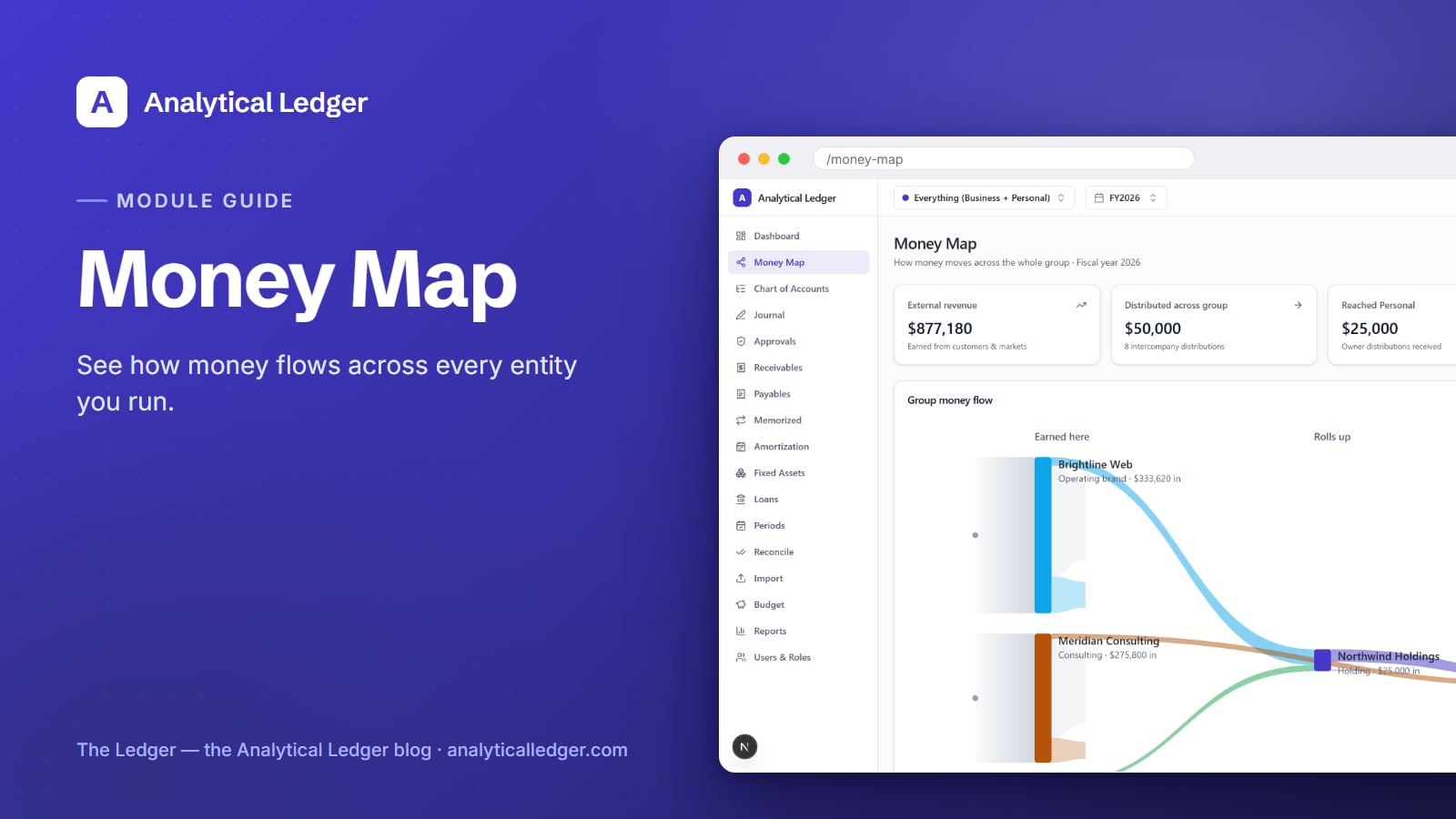
- The Money Map is a group-wide view of how money moves across every entity you own — from external revenue earned from customers, through the intercompany distributions that roll profit up the group, to what finally reaches your personal finances. Open it on a consolidation group and read the three-column flow left to right.
- It sits among the full module lineup: four stat cards frame the headline numbers — external revenue, distributions across the group, what reached personal, and how many entities are mapped.
- Every distribution is two matched, balanced entries tagged intercompany — so your consolidated reports eliminate them automatically and never double-count.
- Best paired with multi-entity accounting once you have more than one set of books.
Why can't you see where the money actually goes?
Because it lives in separate places. The operating company earns it, a distribution moves it to the holding company, another moves it to you — and each leg is a journal entry in a different set of books. Read one entity at a time and you never see the path end to end.
That is the tax that comes with running more than one entity. When the operating company had a strong quarter, the money you actually took home is buried across three ledgers. When cash feels tight, you can't tell whether the business under-earned or just hasn't distributed yet. The picture exists — it's just scattered, and stitching it together by hand is exactly the work that stops getting done when the business gets busy.
The Money Map assembles that path for you. Instead of opening each entity and doing the arithmetic in your head, you open one screen and read the flow.
How to read the Money Map, step by step
The Money Map renders the whole group as a left-to-right flow: money earned from customers on the left, rolled up through the group in the middle, reaching you on the right. Read it in four passes — set the view, scan the stat cards, follow the flow, then confirm the health checks. Each pass answers a different question.
1. Switch your view to a consolidation group
The Money Map works on a consolidation group — a named roll-up of entities — not a single set of books. Use the entity switcher at the top of the app to select your group (the roll-up of your holding, operating, consulting, and personal entities) rather than one entity. On a single-entity view there is no cross-entity flow to draw; the map needs the group to have something to map.
2. Scan the four stat cards
Across the top sit four numbers that frame the whole picture. External revenue is money earned from real customers and markets — the money that entered the group from outside, not shuffled within it. Distributed across group counts the intercompany distributions that moved profit between your entities. Reached personal is the share that landed in your personal finances as owner distributions. Entities mapped tells you how many sets of books are in the view, so you know the map is complete.
3. Follow the group money flow, left to right
Below the cards is a Sankey-style diagram in three columns: Earned here → Rolls up → Reaches you. The left column shows which entities earned money from outside customers. The middle shows it rolling up through the group by way of distributions. The right shows what reached your personal entity. Follow a band from left to right and you trace one dollar's whole journey — from the customer who paid it to the account it finally rests in.
4. Confirm the group-health checks
Finally, the group-health badge tells you whether the group hangs together — for example, that every entity balances and the intercompany legs match. When the checks pass, the map you're reading is built on books that are correct to the cent. If a check fails, fix it at the source before you trust the totals: post the correcting entry in the entity that's off, the way journal entries are meant to be corrected.
What keeps intercompany distributions correct?
A distribution is recorded as two matched, balanced entries, tagged intercompany — one in the entity sending the profit, one in the entity receiving it — so the money is never created or lost, only moved. Because both legs carry the intercompany tag, your consolidated reports eliminate them automatically. The group's outside picture stays true.
This matters more than it sounds. Without elimination, a dollar earned by the operating company and distributed to the holding company would appear as revenue twice — once where it was earned, once where it landed — and your consolidated P&L would overstate the group. The Money Map only counts external revenue as money that entered from outside customers, and treats every internal move as a transfer, not new income. That is why the "external revenue" card and the "distributed across group" card measure two genuinely different things.
And because posted entries are immutable, you don't edit a distribution after the fact — you post a reversing entry. The trail of what moved, and when, stays intact. Correctness here isn't a setting you switch on; it's enforced in the app and again by database triggers, so an unbalanced distribution can't be saved in the first place.
We run our own group of companies — and our personal finances — on Analytical Ledger, daily, in production. The Money Map is the screen we open to answer "did the business actually pay us this quarter" without opening four ledgers and adding it up by hand.
What owners get wrong about the Money Map
The most common mistake is reading the "external revenue" number as everything that moved. It isn't. External revenue is only money that entered the group from outside customers; the distributions between your entities are counted separately, so nothing is double-counted. If you add the two together looking for a grand total, you're mixing new money with moved money.
The second mistake is expecting the map on a single entity. Open one set of books and there's no cross-entity path to draw — the flow only appears on a consolidation group. The third is treating a failed health check as a Money Map problem. It isn't; the map is a mirror. A failed check means an underlying entry needs fixing, and the fix lives in that entity's ledger, not on this screen.
Frequently Asked Questions
What is the Money Map in Analytical Ledger?
The Money Map is a group-wide view of how money moves across every entity you own. It shows external revenue earned from customers, the distributions that roll that profit up through the group, and what reaches your personal finances — as a left-to-right flow diagram with headline stat cards and a group-health badge on top.
Do I need more than one entity to use the Money Map?
Yes. The Money Map draws the flow of money between entities, so it works on a consolidation group — a named roll-up of two or more sets of books. On a single-entity view there is no cross-entity path to show. It's most useful once you run an operating company plus a holding company or your personal finances alongside.
Why doesn't external revenue include intercompany distributions?
Because they're different kinds of money. External revenue is what entered the group from outside customers; a distribution just moves existing profit between your own entities. Counting a distribution as revenue would record the same dollar twice. The Money Map keeps them on separate stat cards so your consolidated picture reflects only money that actually came from the market.
How does the Money Map avoid double-counting intercompany money?
Every distribution is posted as two matched, balanced entries tagged intercompany — one sending, one receiving. Because both legs carry that tag, consolidated reports eliminate them automatically, so an internal transfer never inflates group revenue or profit. The money is moved, never created, and the elimination happens without any manual adjustment from you.
What does the group-health badge mean?
The group-health badge summarizes whether the group's books hang together — for example, that every entity balances and the intercompany legs match. When the checks pass, the totals on the Money Map rest on books that are correct to the cent. If a check fails, correct the underlying entry in the entity that's off before trusting the numbers.
Ready to see the whole picture in one place? Explore Analytical Ledger and open the Money Map on your own group of entities — free, no monthly fee, your data yours to keep.
About Analytical Solutions. We build Analytical Ledger — free, multi-entity, double-entry accounting where personal finances are a first-class entity and consolidation is built in. We run our own group of companies on it, daily, in production. Learn more about us.